Help ·
Quran translations in 41 languages: choose, compare and change the language
Global Quran has 96 translations of the Quran in 41 languages, free to read online and in the apps. You can show one under each verse, put several side by side to compare them, add transliteration, and see the meaning of each Arabic word. This article shows how.
Choose a translation
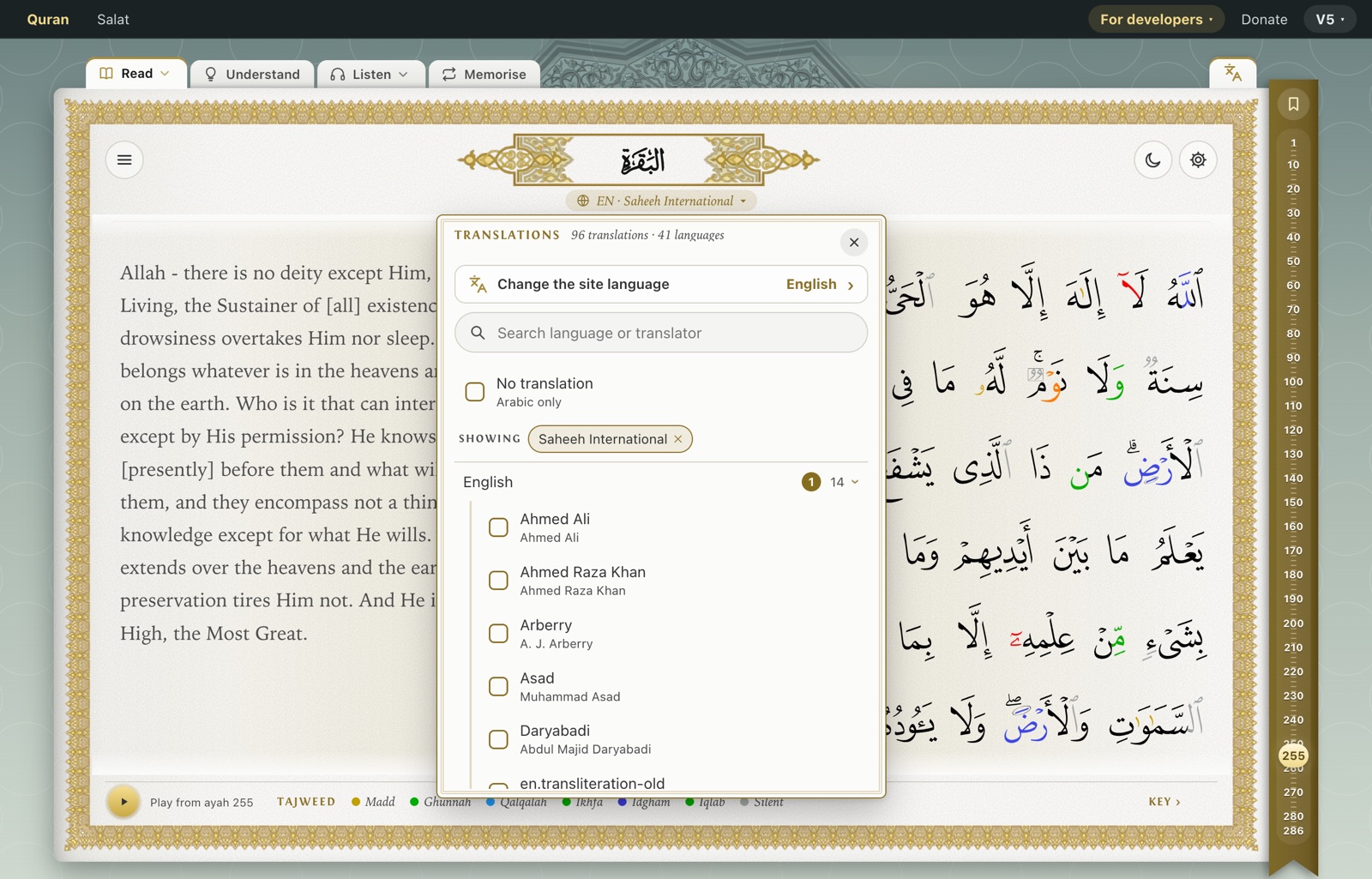
- Open any surah, for example Ayat al-Kursi (2:255).
- Tap the translation name under the surah title (it reads something like "EN · Saheeh International").
- Type a language or a translator's name in the search box, or scroll the list, and tick the one you want.
Tick more than one and they are shown together under each verse, which is the easiest way to compare how translators understood a verse. Choose "No translation" to read the Arabic alone.
Which translations are there?
A few of the 41 languages, with some of their translators:
- English (14): Saheeh International, Abdullah Yusuf Ali, Marmaduke Pickthall, Muhammad Asad, Hilali & Khan, Abul Ala Maududi, Muhammad Sarwar, Mohammad Habib Shakir, A. J. Arberry, Abdul Majid Daryabadi and more.
- Urdu (7): Fateh Muhammad Jalandhry, Abul A'ala Maududi, Ahmed Raza Khan, Tahir ul Qadri, Muhammad Junagarhi and more.
- Turkish (9): Diyanet Vakfı, Elmalılı Hamdi Yazır, Süleyman Ateş and more.
- Persian (10), Russian (7), German (4), Indonesian, Bengali, French (Hamidullah), Spanish, Malay, Hindi, Chinese, Japanese, Korean, Swahili, Hausa, Somali, Bosnian, Albanian, Tamil, Malayalam, Sindhi, Uzbek, Tajik, Kurdish, Divehi and others.
Developers can get the same translations as data from the Global Quran API.
Hear the translation too
Some languages have a translation voice: a recording of the translation that plays after the Arabic recitation of each verse. English is read by Ibrahim Walk and Urdu by Shamshad Ali Khan, and there are voices in other languages too. Pick one in the player's voice menu, or listen to the translation alone. See how to listen to the Quran online.
Word by word and transliteration
- Word by word: switch it on in the sidebar's Settings, then point at or tap an Arabic word to see what it means. Good for learning Quranic Arabic one word at a time.
- Transliteration: the Arabic in Latin letters under each verse, to help you recite before you can read the script. It is on by default and can be switched off in Settings.
Use Global Quran in your own language
The menus and buttons of Global Quran come in 29 languages, among them Arabic, Urdu, Bengali, Indonesian, Turkish, Persian, French, German, Spanish, Malay, Hindi, Chinese and Russian. Choose yours from the language button at the top. Picking a language also picks a translation in that language, and its translation voice when there is one; you can change either afterwards. The translation picker has a "Change the site language" row too, for people who look for it there.
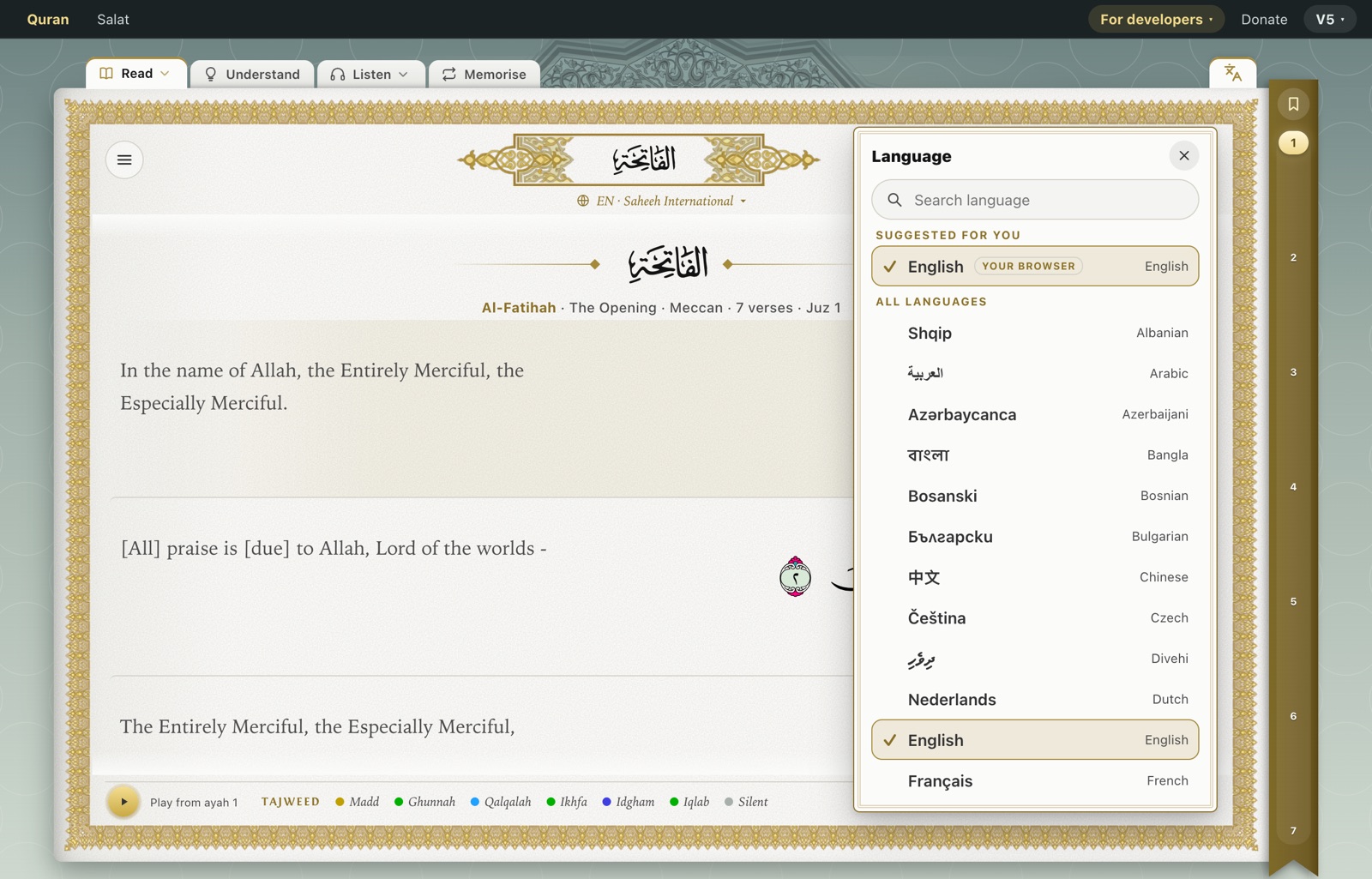
Keep your choice
Your translations are remembered on the device. Sign in if you want them on your phone, tablet and computer alike: see saved verses and sync. The same choices work in the Global Quran apps.
Open Ayat al-Kursi and try a translation, or read how to read the Quran online.